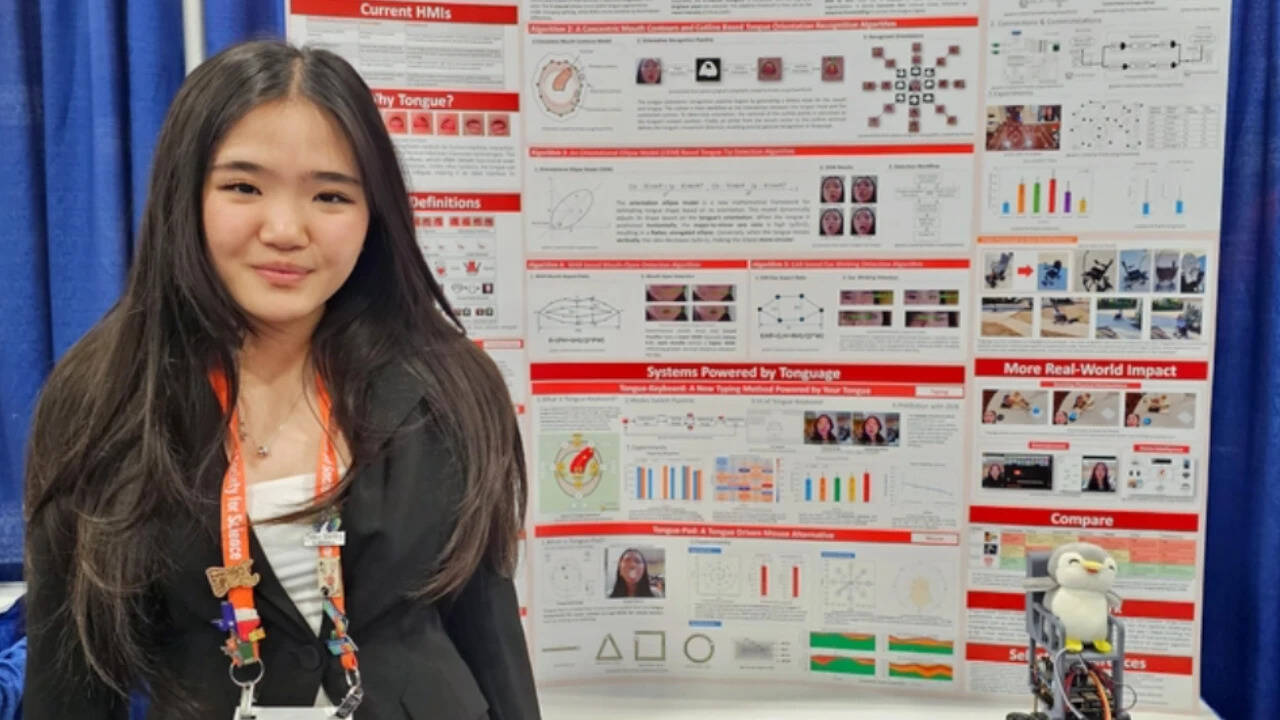
Most assistive tech fails the people who need it most. Think about that for a second. A California teenager just won $10,000 for building a system that controls computers using tongue movements and blinks, and honestly, it exposes a massive blind spot in how Silicon Valley thinks about accessibility.
For years, the tech industry threw billions at brain implants and pricey eye-tracking cameras. Both have huge flaws. Brain implants require invasive surgery. Eye trackers get confused by glare, drift out of calibration, and cause severe eye strain after twenty minutes of typing. When a high schooler solves a multi-million-dollar hardware bottleneck with simple facial gestures, you have to pay attention.
Let's break down how tongue and blink computer interfaces actually work, why the human tongue is a biological marvel for machine control, and what this $10,000 breakthrough means for the future of hands-free computing.
How a Tongue and Blink Computer Control System Works
You don't need a surgically implanted chip to turn your mouth into a computer mouse. Modern computer vision and lightweight machine learning models can track subtle facial landmarks using nothing more than a standard webcam or a low-cost optical sensor.
Here's the basic mechanics behind a dual-input system using tongue movements and eye blinks.
First, a camera maps key points across your face in real time. Software frameworks like Google's MediaPipe can track hundreds of facial coordinates at sixty frames per second on an ordinary laptop processor. When you move your tongue inside your cheek or poke it slightly forward, your cheek contour and lip geometry shift in predictable ways.
Second, the algorithm separates intentional commands from normal biological habits. Everybody blinks. Everybody swallows. If your cursor clicked every time your eyelids closed to moisten your eyes, the computer would be completely unusable.
To fix this, developers use duration thresholds and paired triggers. A rapid, involuntary blink lasts about 100 to 150 milliseconds. An intentional, prolonged blink—or a specific wink—lasts closer to 400 milliseconds. By pairing directional tongue movements for cursor navigation with deliberate blinks for clicking or scrolling, the software creates a reliable two-factor input loop.
It's fast. It's non-invasive. And best of all, it doesn't require $5,000 worth of proprietary medical hardware.
Why the Human Tongue Beats Traditional Assistive Hardware
If you've never worked with assistive technology, using your tongue to steer a cursor might sound weird. Maybe even gimmicky. Once you look at human neuroanatomy, though, the choice makes complete sense.
The tongue is connected directly to the brain via the hypoglossal nerve (the twelfth cranial nerve). Because this nerve pathway bypasses the spinal cord entirely, people with severe spinal cord injuries, quadriplegia, or late-stage neuromuscular conditions like ALS often retain full, precise control over their tongue long after losing mobility in their limbs.
Even better, the tongue is an absolute powerhouse of fine motor control.
Consider how effortlessly you shape complex vowel and consonant sounds during normal conversation without ever biting your own cheek. Your tongue moves with sub-millimeter accuracy, reacts in milliseconds, and rarely fatigues. Compare that to a sip-and-puff switch—a common assistive device where users blow or suck air through a straw to trigger binary commands. Sip-and-puff systems are slow, exhausting to use for hours, and notorious for hygiene issues.
Eye trackers aren't much better for precision work. Your eyes weren't evolved to act as pointing devices; they were evolved to scan environments rapidly. When you force your eyes to stare at a tiny close button on a browser tab to trigger a dwell-click, you fight against natural visual reflexes. Researchers call this the "Midas Touch" problem—everything you look at gets activated whether you want it to or not.
Offloading directional control to the tongue and reserving intentional blinks for selection completely eliminates the Midas Touch problem. You can look freely around your screen while steering the cursor independently.
The Real Cost Barrier in Assistive Technology
Let's talk money, because price is where most promising accessibility tools die.
Commercial eye-tracking communication devices routinely cost between $3,000 and $15,000. Insurance companies fight tooth and nail to deny coverage, forcing families to launch crowdfunding campaigns just so a loved one can send an email or browse the web. Even when insurance approves a device, getting replacement parts or software updates can take months.
Now contrast that with camera-based tongue and blink tracking.
When the intelligence lives in software rather than custom infrared sensors, the hardware requirement drops to a basic $30 webcam—or the built-in camera already sitting on top of a laptop or tablet. A $10,000 prize for a student-built prototype isn't just a nice headline; it represents a massive return on investment when a single commercial medical device costs more than the entire prize pool.
Where Existing Tongue Interfaces Went Wrong
This California teen wasn't the first person to look at the tongue as a controller, which makes the software-first approach even more impressive.
Back in the late 2000s and 2010s, researchers at institutions like Georgia Tech developed systems like the Tongue Drive System. Those early prototypes required users to get their tongues pierced with a tiny magnetic stud, or wear bulky orthodontic retainers packed with inductive sensors and batteries inside their mouths.
Think about the practical reality of putting electronics inside someone's mouth. Saliva corrodes circuits. Lithium batteries pose safety risks. Cleaning daily retainers requires caregiver assistance, and magnetic tongue piercings carry serious infection risks for immunocompromised patients.
By keeping everything external and optical—relying purely on visual tracking of tongue movements and blinks—you eliminate every single intraoral hygiene and safety hazard overnight.
Common Misconceptions About Facial Gesture Computing
Whenever a story about hands-free computer control goes viral, the comment sections fill up with the exact same misunderstandings. Let's clear them up right now.
- Myth 1 You need lab-grade lighting for camera tracking to work. While early computer vision broke down the second a cloud passed over the sun, modern landmark detection models are trained on millions of diverse faces in dim bedrooms, harsh office fluorescents, and uneven outdoor lighting. As long as your webcam can see your face clearly enough for a standard Zoom call, landmark tracking works.
- Myth 2 Facial gestures cause severe muscle fatigue. People assume holding a gesture tires out your face. That's only true if the software forces you to hold exaggerated expressions, like keeping your mouth wide open. Subtle lateral tongue movements inside the cheek or small downward tips require almost zero muscular effort, letting users work comfortably for hours.
- Myth 3 Voice recognition already solved hands-free computing. Voice control is great for dictating paragraphs, sure. Try editing a spreadsheet, playing a video game, or navigating a cluttered website using only your voice. Saying "click link, scroll down, move left ten pixels" is agonizingly slow. Plus, voice commands fail completely in noisy rooms, shared hospital wards, or for users whose conditions affect their speech clarity.
What Developers and Users Can Do Right Now
You don't have to wait five years for a mega-corporation to commercialize student research. Open-source facial tracking tools are already mature enough for real-world testing today.
If you're a developer, caregiver, or someone looking for low-cost hands-free computer access, start with these immediate steps:
- Test existing open-source camera mice. Tools like Google's Project Gameface and OpenCV-based head/face trackers let you map facial expressions and blinks to standard mouse clicks and keyboard shortcuts right now using a standard Windows or Linux webcam.
- Optimize camera placement before tweaking code. Mount your webcam directly at eye level, roughly 18 to 24 inches from your face. Laptops sitting low on a desk point upward at an awkward angle that obscures subtle cheek and lip shifts caused by tongue movement.
- Separate navigation from selection. Never map both cursor movement and clicking to the same muscle group. Pair continuous directional inputs—like subtle tongue shifts or micro-head tilts—with a distinct binary trigger like a 400-millisecond intentional blink.
- Build in customizable dead zones. Every user has different baseline facial symmetry and involuntary twitch patterns. Any practical interface needs adjustable sensitivity sliders so minor resting movements don't send the cursor drifting across the monitor.
Assistive technology shouldn't require a second mortgage or an invasive surgery just to click a mouse. Sometimes the smartest engineering breakthrough is realizing the human body already has the exact controller it needs—and building software smart enough to read it.